
Measure how closely a person keeps time with a beat
A steady beat, a finger tap or hand clap, and clear timing measures in milliseconds, beat by beat — with nothing ever leaving the device.
Keeping time with a beat, measured response by response
Tempo Trace plays a steady metronome beat and measures how closely each response — a finger tap on the screen, or a hand clap heard by the microphone — lines up with it. Every response gets a signed timing offset in milliseconds: negative means early, before the beat; positive means late, after it. It's a timing measurement tool that uses a metronome beat. The app measures and reports timing — it doesn't interpret or diagnose.
Finger Tap or Clap
The person taps a large target area on the screen in time with the beat. Timing uses the moment the finger touches down — not when it lifts — taken directly from the touchscreen's own timestamp. iPhone and iPad.
The person claps in time with the beat, with the phone flat on a table — no need to touch the device during the session. The microphone detects each clap, and the app tells claps apart from its own beat, even when a clap lands right on it. iPhone only, because of microphone constraints on iPad.
Clap mode is available on iPhone only, because of microphone constraints on iPad — Finger Tap works on both iPhone and iPad. Tap and clap results are kept separate and labelled — they're measured differently and aren't meant to be compared with each other.
A feedback-free measure, or practice with feedback
No feedback of any kind during the session — no scores, counters, early/late indicators, sounds or vibrations. The screen stays neutral and shows only the time remaining.
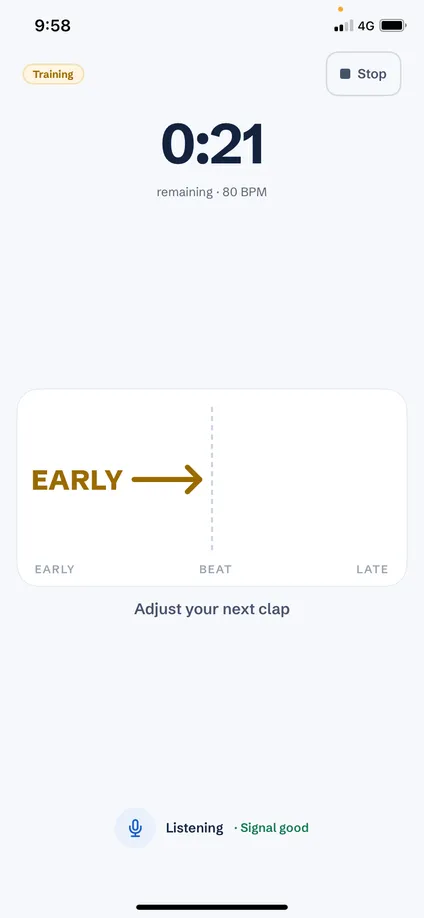
After each response the screen shows EARLY →, ON BEAT ◎ or ← LATE, with an arrow pointing toward the correction for the next response. Arrow size reflects how far off the response was.
A workflow built for real administration
From set-up to reading the result, every session follows the same clear process.
Finger Tap or Clap, Testing or Training.
Use a preset or enter an exact value, then play a sample beat to check the volume.
A 4-beat count-in at the same tempo, then the session. The beat comes from the audio system with sample-level precision and is never shifted by the person’s responses.
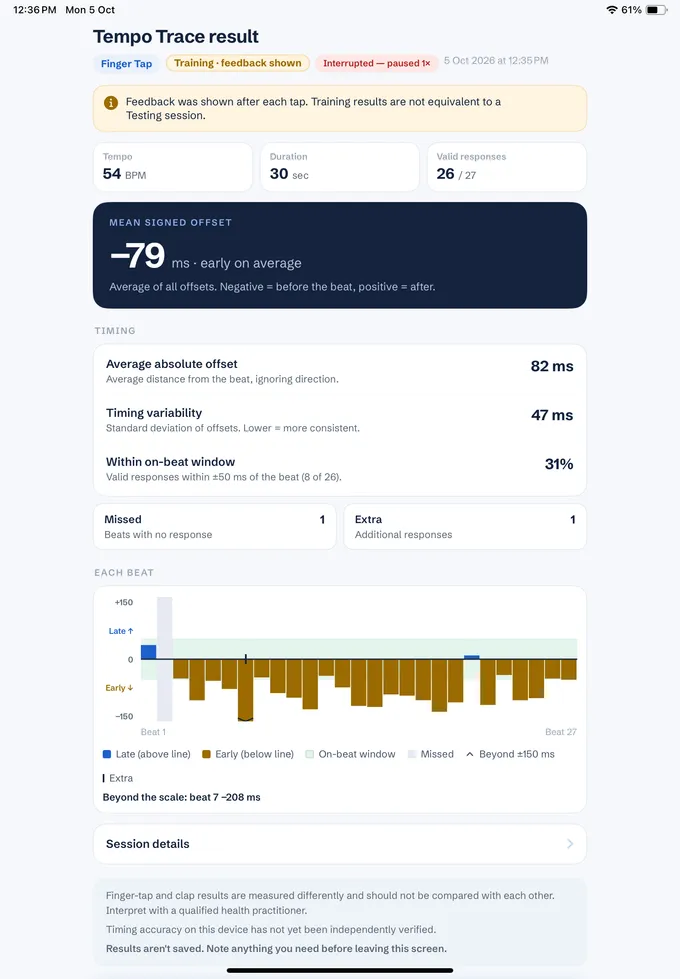
Summary measures plus a beat-by-beat chart, clearly labelled.
Set it up once, repeat it consistently
Clear timing measures
The primary figure is the mean signed offset — on average, how early or late the person was — which maps directly to the Training arrows. There's no composite score, and any measure with too few valid responses is shown as unavailable rather than as a misleading zero. Every result is labelled with method, mode, tempo, duration and status.
Reliability and data integrity
Private by design
Clap detection, matching and scoring all happen on the device. Clap mode analyses sound as it arrives and never records or saves audio. There's no account, no network connection, and no analytics or advertising SDKs of any kind.
Accessible by default
Who it's for
A quick, repeatable, quantified measure of keeping time with an external beat.
Training mode gives immediate early/late feedback for practice; Testing mode gives a feedback-free measure.
Timing and coordination tasks with a simple, consistent set-up.
Beat-level timing data, with full settings, device and analysis-version labelling on every result.
Common questions
An iPhone or iPad for Finger Tap. Clap mode is available on iPhone only, because of microphone constraints on iPad — it also needs a reasonably quiet room and the phone lying flat on a table.
No. Tempo Trace doesn't give a diagnosis, an impairment classification, a treatment recommendation, a normative comparison or a composite score. It measures timing — the interpretation is always yours.
There's a room check before the first Clap session and live noise monitoring during it, and low-confidence claps are left out of the timing measures. If the room isn't suitable, you can switch to Finger Tap in one tap.
Bluetooth and AirPlay are blocked because their delay varies, so use the device's built-in speaker. Wired headphones are allowed for Finger Tap but are flagged as unvalidated.
No. Sound is analysed on the device as it arrives and is discarded straight away — it is never recorded, saved or uploaded. Read our privacy policy for details.
Not in the current version — results aren't kept after you leave the results screen, so note down anything you need first. Get in touch if export is something you need.
Pricing varies by region — see the App Store for the price in your country once Tempo Trace launches.
Tempo Trace is in development as part of our Neuro Tools suite. Get in touch to be notified when it lands on the App Store.
Be first to know when it launches
Tempo Trace is coming to the App Store as part of the Neuro Tools suite.